Virtual Meeting Etiquette: The Complete Guide to Professional and Productive Online Meetings

Virtual Meeting Etiquette
Virtual meetings have become a cornerstone of modern communication, transforming the way businesses, educational institutions, and organisations connect across cities and continents. A single online meeting can bring together employees, clients, educators, and stakeholders from different time zones without requiring travel. While technology has made collaboration easier than ever, successful online communication depends on more than just having a reliable internet connection. Professional behaviour, respectful communication, and thoughtful preparation play equally important roles.
Virtual Meeting Etiquette is the collection of professional practices that ensure online meetings remain productive, respectful, and engaging. Whether participating in a weekly team meeting, a job interview, a client presentation, or a virtual classroom, following proper etiquette helps everyone communicate effectively while reducing distractions and misunderstandings. Good etiquette reflects professionalism, builds trust, and creates an environment where every participant feels heard and respected.
Many people assume virtual meetings are less formal than face-to-face interactions, but the opposite is often true. Every action, from joining on time to speaking clearly and maintaining eye contact with the camera, influences how others perceive professionalism. Small habits can have a significant impact on meeting outcomes, making Virtual Meeting Etiquette an essential skill for today’s workplace.
Understanding Virtual Meeting Etiquette
Virtual Meeting Etiquette refers to the accepted standards of behaviour that promote respectful, organised, and efficient communication during online meetings. These standards apply regardless of whether the meeting takes place on Zoom, Microsoft Teams, Google Meet, Cisco Webex, or any other video conferencing platform.
Unlike traditional meetings, virtual communication introduces challenges such as internet interruptions, audio delays, background noise, and limited non-verbal communication. Proper etiquette helps minimise these obstacles while allowing participants to focus on meaningful discussion rather than technical distractions.
Professional etiquette also demonstrates respect for everyone’s time. Joining prepared, contributing appropriately, and staying engaged show colleagues and clients that their time and opinions are valued.
Why Virtual Meeting Etiquette Matters
Virtual meetings consume a significant portion of the modern workday. Poorly managed meetings often lead to confusion, repeated discussions, delayed decisions, and reduced productivity. Good etiquette creates structure, allowing meetings to accomplish their objectives more efficiently.
Professional behaviour also strengthens relationships between team members. Respectful communication encourages collaboration, improves morale, and reduces workplace misunderstandings. Employees who consistently demonstrate excellent meeting etiquette are often viewed as reliable, organised, and capable communicators.
Clients also form impressions based on virtual interactions. A well-prepared presenter who speaks confidently, maintains professionalism, and manages technology effectively builds credibility and trust. These qualities can influence business relationships, negotiations, and future opportunities.
Preparing Before the Meeting
Review the Meeting Purpose
Preparation begins long before clicking the meeting link. Reading the agenda provides clarity about discussion topics, objectives, and expected outcomes. Participants who understand the meeting’s purpose can prepare questions, collect relevant information, and contribute meaningful ideas instead of reacting spontaneously.
Understanding the agenda also prevents unnecessary interruptions because participants already know when particular topics will be discussed.
Test Your Technology
Technical problems can quickly derail an otherwise productive meeting. Testing equipment beforehand helps eliminate avoidable interruptions. Participants should verify that their microphone, speakers, webcam, and internet connection are functioning correctly before joining.
Updating meeting software beforehand also prevents delays caused by unexpected installations or compatibility issues. Closing unnecessary applications improves computer performance while reducing internet bandwidth usage.
Choose an Appropriate Environment
The meeting environment significantly affects communication quality. Selecting a quiet room with minimal distractions helps maintain professionalism throughout the discussion. Family conversations, television sounds, barking dogs, or construction noise can distract everyone participating.
Lighting also deserves attention. Natural light positioned in front of the participant usually creates the clearest appearance, while sitting with bright windows behind can leave faces poorly illuminated. A simple, uncluttered background further enhances professionalism and keeps attention focused on the speaker.
Dress Professionally
Clothing communicates professionalism even during online meetings. Appropriate attire should reflect the meeting’s purpose, company culture, and audience expectations. Business meetings with clients generally require more formal clothing than internal team discussions.
Professional appearance also influences personal confidence. Many people feel more focused and prepared when dressed appropriately rather than treating virtual meetings casually.
Joining the Meeting Correctly
Arrive Early
Joining several minutes before the scheduled start demonstrates punctuality and allows time to resolve technical issues before discussions begin. Early arrival also enables casual conversation with colleagues, helping recreate the informal interactions that naturally occur before face-to-face meetings.
Late arrivals interrupt conversations and may require meeting hosts to repeat previously discussed information, reducing efficiency for everyone involved.
Introduce Yourself When Necessary
Meetings involving external partners, new employees, or large groups often require introductions. Clearly stating your name and role helps participants understand your involvement and creates a more welcoming atmosphere.
Simple introductions also improve communication by helping participants associate names with faces during future discussions.
Camera Etiquette During Virtual Meetings
Position the Camera Properly
Camera placement influences how participants appear on screen. Positioning the camera at eye level creates a more natural viewing angle while promoting comfortable eye contact. Looking downward at a laptop or upward from a low camera can appear less engaging.
Maintaining appropriate distance also ensures that facial expressions remain visible without appearing uncomfortably close.
Maintain Eye Contact
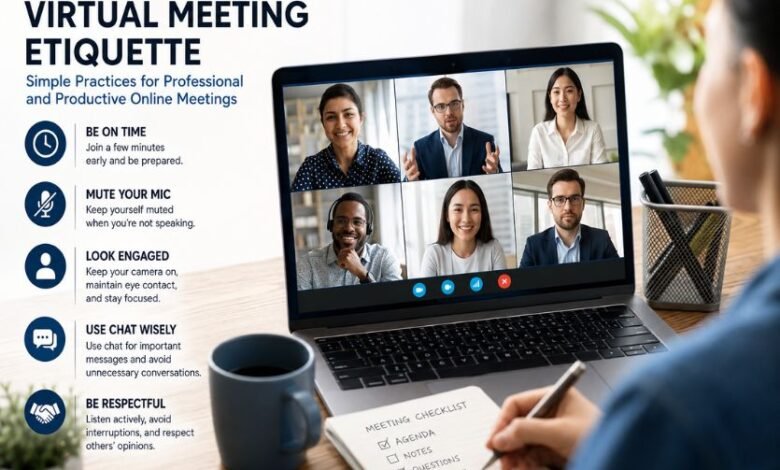
Eye contact remains one of the strongest elements of communication, even in virtual settings. Looking toward the camera while speaking gives participants the impression of direct engagement rather than appearing distracted by other screens.
Although checking notes occasionally is acceptable, consistently focusing on the camera strengthens communication and builds stronger connections with the audience.
Use Appropriate Facial Expressions
Facial expressions communicate attentiveness, agreement, curiosity, and understanding. Smiling when appropriate, nodding during conversations, and maintaining an attentive expression encourage positive interaction without requiring constant verbal responses.
Audio Etiquette for Better Communication
Mute When Not Speaking
Background noise remains one of the most common distractions during virtual meetings. Keeping microphones muted while others speak prevents keyboard sounds, coughing, pets, traffic, or household noises from interrupting conversations.
Participants should unmute only when contributing to discussions and mute again immediately afterwards.
Speak Clearly
Speaking slowly and clearly improves understanding, particularly when participants join from different countries or have varying internet quality. Short pauses between sentences allow software to process audio more effectively while giving participants time to absorb information.
Clear communication reduces misunderstandings and limits the need for repeated explanations.
Avoid Interrupting Others
Online conversations naturally involve slight audio delays, making interruptions more likely than during face-to-face meetings. Waiting briefly before responding ensures previous speakers have finished completely.
Many meeting platforms also include a raise-hand feature that allows participants to indicate they wish to speak without interrupting ongoing discussions.
Professional Behaviour During Meetings
Stay Focused
Virtual meetings require active attention. Checking emails, browsing websites, replying to messages, or working on unrelated tasks divides concentration and reduces participation quality.
Participants who remain engaged contribute more thoughtful responses, ask relevant questions, and help meetings progress efficiently.
Participate Respectfully
Meaningful participation involves listening carefully before speaking, respecting differing opinions, and contributing ideas constructively. Healthy discussions often involve disagreement, but professionalism requires expressing alternative viewpoints respectfully rather than dismissing others.
Encouraging balanced participation also ensures quieter attendees have opportunities to contribute.
Avoid Multitasking
Although working from home provides easy access to numerous distractions, multitasking often reduces comprehension and meeting effectiveness. Attempting to complete unrelated tasks while listening usually results in missed information and weaker contributions.
Remaining mentally present demonstrates respect for both meeting organisers and fellow participants.
Chat Etiquette in Virtual Meetings
Meeting chat features support collaboration when used appropriately. Participants can share links, documents, references, or questions without interrupting speakers. However, unrelated conversations, jokes, or excessive messaging can distract everyone and reduce meeting focus.
Professional chat communication should remain relevant, respectful, and concise. Before sending messages, participants should consider whether the information benefits everyone or should instead be shared privately after the meeting.
Screen Sharing Best Practices
Screen sharing often forms the centre of presentations, demonstrations, and collaborative discussions. Before sharing, participants should close unrelated applications, disable unnecessary notifications, and organise documents for quick access.
Displaying confidential emails, personal messages, or unrelated browser tabs can appear unprofessional and potentially expose sensitive information.
Practising presentations beforehand also ensures smooth transitions between slides, applications, and documents.
Virtual Meeting Etiquette for Meeting Hosts
Meeting hosts carry additional responsibility for creating productive discussions. Effective hosts prepare detailed agendas, invite appropriate participants, distribute relevant materials beforehand, and begin meetings punctually.
During discussions, hosts should encourage balanced participation, monitor chat questions, manage speaking order, and keep conversations aligned with meeting objectives. Respecting scheduled end times demonstrates appreciation for participants’ commitments while preventing unnecessary delays.
Following the meeting, hosts should distribute summaries, action items, responsibilities, and deadlines so participants understand next steps clearly.
Virtual Meeting Etiquette for Participants
Participants contribute significantly to meeting success. Joining prepared, reviewing shared documents beforehand, arriving punctually, and actively engaging throughout discussions all demonstrate professionalism.
Participants should also remain patient when technical issues occur. Internet interruptions, temporary audio problems, or software glitches occasionally affect everyone. Responding calmly rather than expressing frustration helps maintain a positive meeting atmosphere.
Common Mistakes to Avoid
Many virtual meetings lose effectiveness because participants overlook basic etiquette principles. Speaking while muted, leaving microphones unmuted unnecessarily, arriving late, forgetting meeting objectives, checking phones repeatedly, interrupting colleagues, or appearing distracted all reduce professionalism.
Another common mistake involves overusing virtual backgrounds that distract from discussion. Simple, professional backgrounds generally create better visual experiences than animated or highly decorative alternatives.
Ignoring follow-up responsibilities also limits meeting value. Completing assigned tasks promptly demonstrates accountability and respect for team collaboration.
Virtual Meeting Etiquette in Hybrid Workplaces
Hybrid workplaces combine employees working remotely with colleagues attending meetings in person. These environments require additional attention to fairness and inclusion.
Meeting organisers should ensure remote participants can hear discussions clearly, view shared materials easily, and contribute equally throughout conversations. Repeating comments made within the physical meeting room prevents remote attendees from feeling excluded.
Technology also plays an important role in hybrid collaboration. High-quality microphones, cameras, and conference room equipment help create balanced communication between both groups.
Cultural Awareness in Global Meetings
Global organisations frequently conduct meetings involving participants from multiple countries and cultures. Virtual Meeting Etiquette therefore extends beyond technical professionalism to include cultural awareness and respectful communication.
Speaking clearly without excessive slang helps international participants understand discussions more easily. Respecting different communication styles, holidays, time zones, and cultural expectations demonstrates professionalism while strengthening international collaboration.
Scheduling meetings at reasonable times for all participants whenever possible also reflects respect for global teams.
The Role of Artificial Intelligence in Virtual Meetings
Artificial intelligence continues transforming virtual meetings through automated transcription, note-taking, meeting summaries, language translation, and scheduling assistance. While these technologies improve efficiency, transparency remains essential.
Participants should know when AI recording or transcription tools are active. Informing attendees about data collection, recording practices, and information storage helps maintain trust while respecting privacy expectations.
AI should enhance communication rather than replace genuine human interaction and thoughtful participation.
Building Long-Term Professional Reputation
Consistently following Virtual Meeting Etiquette contributes to a positive professional reputation over time. Colleagues notice individuals who communicate respectfully, prepare thoroughly, participate thoughtfully, and demonstrate reliability during meetings.
Strong communication skills often influence leadership opportunities, client relationships, career advancement, and overall workplace credibility. While technical expertise remains valuable, professionalism during virtual interactions frequently distinguishes outstanding employees from average performers.
Every online meeting represents an opportunity to reinforce trust, showcase communication skills, and contribute positively to organisational success.
Conclusion
Virtual Meeting Etiquette has become an essential professional skill rather than an optional courtesy. Successful virtual communication depends on thoughtful preparation, respectful behaviour, reliable technology, active participation, and effective follow-up. Every participant, whether hosting or attending, contributes to creating productive meetings that achieve meaningful results.
As remote and hybrid work continue shaping modern organisations, mastering Virtual Meeting Etiquette will remain increasingly valuable. Professionals who consistently demonstrate punctuality, clear communication, respectful collaboration, and technical readiness not only improve meeting outcomes but also strengthen their reputation as dependable and effective communicators. By making these practices part of every online interaction, individuals and organisations can transform ordinary virtual meetings into engaging, efficient, and highly productive experiences.